spring 狂神说spring笔记
优点
spring boot
学习springboot的前提是spring和springMVC
一、IOC set接口实现 1 2 3 4 5 private UserDao userDao;public void setUserDao (UserDao userDao) this .userDao = userDao; }
主动权(控制权)由程序员变为了用户,实现了==控制反转 ==
程序不再具有主动性,变为了被动的接收对象
本质 是spring的核心内容,是一种设计思想,其实现方法是依赖注入(DI)
控制反转就是获得对象的方式反转了
HelloSpring 1 2 3 4 5 6 7 8 9 10 11 12 13 14 <bean id ="hello" class ="com.nuc.Hello" > <property name ="str" value ="Spring" /> </bean >
hello的对象是由spring创建的
hello的属性是由spring容器设置的
这个过程就是控制反转
IOC是一种编程思想,由主动的编程变为被动的接收
要实现不同的操作只需要在xml配置文件中进行修改 ,所谓的IOC就是:==对象由spring来创建,管理,装配 ==
src/main/resources bean.xml
1 2 3 4 5 6 7 8 9 10 11 12 13 <bean id ="mysqlImpl" class ="com.nuc.dao.UserDaoMysqlImpl" /> <bean id ="oracleImpl" class ="com.nuc.dao.UserDaoOracleImpl" /> <bean id ="UserServiceImpl" class ="com.nuc.service.UserServiceImpl" > <property name ="userDao" value ="mysqlImpl" /> </bean >
src/test/java MyTest.java
1 2 3 4 5 6 7 8 9 10 public class MyTest public static void main (String[] args) ApplicationContext context = new ClassPathXmlApplicationContext("beans.xml" ); Hello hello = (Hello)context.getBean("hello" ); System.out.println(hello.toString()); } }
IOC创建对象方式
默认采用无参构造创建对象
使用有参构造创建对象
下标赋值
1 2 3 <bean id ="user" class ="com.nuc.User" > <constructor-arg index ="0" value ="姓名" /> </bean >
类型
1 2 3 4 <bean id ="user" class ="com.nuc.User" > <constructor-arg type ="java.lang.String" value ="姓名2" /> </bean >
直接通过参数名来创建(重点掌握)
1 2 3 4 <bean id ="user" class ="com.nuc.User" > <constructor-arg name ="name" value ="姓名3" /> </bean >
在配置文件加载的时候,spring容器中的管理的对象就已经初始化了
二、spring配置 别名 1 2 3 通过别名可以获取到这个对象 <alias name="user" alias="userNew" > name
bean的配置 1 2 3 4 5 6 7 8 9 <bean id ="userT" class ="com.nuc.UserT" name ="user2,u2,u3" > <property name ="name" value ="别名" /> </bean >
import 一般用于团队开发;项目中多个配置文件bean.xml时,使用import将所有的导入到总的applicationContext.xml
1 2 3 <import resource=bean1.xml> <import resource=bean2.xml> <import resource=bean3.xml>
三、依赖注入DI(DI)
1.构造器注入 2.set注入(重点) 本质:set注入
依赖:bean对象的==创建==依赖于容器
注入:bean对象中的所有属性,由==容器==来注入
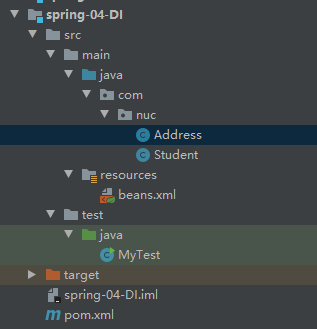
环境搭建
(1)复杂类型 1 2 3 4 5 6 7 8 9 10 11 12 public class Address private String address; public String getAddress () return address; } public void setAddress (String address) this .address = address; } }
(2)真实测试对象 1 2 3 4 5 6 7 8 9 10 11 public class Student private String name; private Address address; private String[] books; private List<String> hobbys; private Map<String,String> card; private Set<String> games; private String wife; private Properties info; }
(3)beans.xml 1 2 3 4 5 6 7 8 9 10 <?xml version="1.0" encoding="UTF-8"?> <beans xmlns ="http://www.springframework.org/schema/beans" xmlns:xsi ="http://www.w3.org/2001/XMLSchema-instance" xsi:schemaLocation ="http://www.springframework.org/schema/beans http://www.springframework.org/schema/beans/spring-beans.xsd" > <bean id ="student" class ="com.nuc.Student" > <property name ="name" value ="姓名" /> </bean > </beans >
(4)测试类 1 2 3 4 5 6 7 8 public class MyTest public static void main (String[] args) ApplicationContext context = new ClassPathXmlApplicationContext("beans.xml" ); Student student = (Student) context.getBean("student" ); System.out.println(student.getName()); } }
(5)完善注入信息 1 2 3 4 5 6 7 8 9 10 11 12 13 14 15 16 17 18 19 20 21 22 23 24 25 26 27 28 29 30 31 32 33 34 35 36 37 38 39 40 41 42 43 44 45 46 47 48 49 50 51 52 53 54 55 56 57 58 59 60 61 62 63 64 65 66 <beans xmlns ="http://www.springframework.org/schema/beans" xmlns:xsi ="http://www.w3.org/2001/XMLSchema-instance" xsi:schemaLocation ="http://www.springframework.org/schema/beans http://www.springframework.org/schema/beans/spring-beans.xsd" > <bean id ="address" class ="com.nuc.Address" > <property name ="address" value ="长春" /> </bean > <bean id ="student" class ="com.nuc.Student" > <property name ="name" value ="姓名" /> <property name ="address" ref ="address" /> <property name ="books" > <array > <value > java疯狂讲义</value > <value > python从零到一</value > <value > C++从入门到精通</value > </array > </property > <property name ="hobbys" > <list > <value > 学习</value > <value > 游戏</value > <value > 娱乐</value > </list > </property > <property name ="card" > <map > <entry key ="身份证" value ="123123123" /> <entry key ="银行卡" value ="111111111" /> </map > </property > <property name ="games" > <set > <value > lol</value > <value > gtf5</value > <value > csgo</value > </set > </property > <property name ="wife" > <null > </null > </property > <property name ="info" > <props > <prop key ="学号" > 20200101</prop > <prop key ="性别" > 男</prop > <prop key ="姓名" > 张三</prop > </props > </property > </bean > </beans >
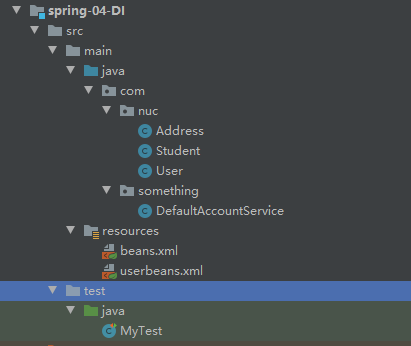
3.扩展方式注入 使用p命名空间和c命名空间进行注入
1 2 3 4 5 6 7 8 9 10 11 12 <?xml version="1.0" encoding="UTF-8"?> <beans xmlns ="http://www.springframework.org/schema/beans" xmlns:xsi ="http://www.w3.org/2001/XMLSchema-instance" xmlns:p ="http://www.springframework.org/schema/p" xmlns:c ="http://www.springframework.org/schema/c" xsi:schemaLocation ="http://www.springframework.org/schema/beans http://www.springframework.org/schema/beans/spring-beans.xsd" > <bean id ="user" class ="com.nuc.User" p:name ="姓名1" p:age ="23" /> <bean id ="user2" class ="com.nuc.User" c:age ="26" c:name ="姓名2" /> </beans >
测试:
1 2 3 4 5 6 @Test public void test2 () ApplicationContext context = new ClassPathXmlApplicationContext("userbeans.xml" ); User user = context.getBean("user2" ,User.class); System.out.println(user); }
注:p命名和c命名不能直接使用,需要导入xml约束
4. bean的作用域 (1)单例模式(spring默认机制) 1 <bean id ="user2" class ="com.nuc.User" c:age ="26" c:name ="姓名2" scope ="singleton" />
(2)原型模式(每次从容器中get时都会产生一个新对象) 1 <bean id ="user2" class ="com.nuc.User" c:age ="26" c:name ="姓名2" scope ="prototype" />
(3)其余的request、session、application(只在web开发中使用) 四、bean的自动装配(autowired)重点
自动装配是spring满足bean依赖的一种方式
spring会在上下文中自动寻找,并给bean装配属性
在spring中的三种装配方式:
在xml中显示的配置
在java中显示配置
隐式的自动装配bean(重要)
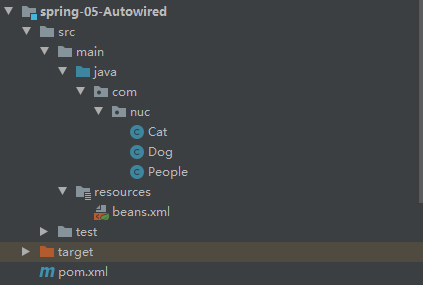
1.测试 环境搭建:一个人有两个宠物
2.ByName自动装配 1 2 3 4 5 6 <bean id ="people" class ="com.nuc.People" autowire ="byName" > <property name ="name" value ="狂神Nb" /> </bean >
3.ByType自动装配 1 2 3 4 5 6 <bean id ="people" class ="com.nuc.People" autowire ="byType" > <property name ="name" value ="狂神Nb" /> </bean >
byname时,要保证所有的bean的id唯一,并且这个bean需要和自动注入的属性的set方法一致
bytype时,要保证所有的bean的class唯一,并且这个bean需要和自动注入的属性的类型一致
4.使用注解实现自动注入 jdk1.5 spring2.5
使用注解需要:
导入约束(context约束)
配置注释的支持==<context:annotation-config/>==
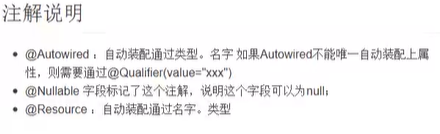
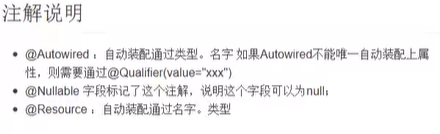
@Autowired
直接在属性或在set方式上使用
使用@Autowired可以不用编写set方法,前提是这个自动装配的属性在IOC(spring)容器中存在,且符合名字byname
如果@Autowired自动装配的环境比较复杂,无法通过一个注释@Autowired完成时,可以使用**@Qualifier(value=”xxx”)**去配置@Autowired的使用,指定唯一的bean对象注入
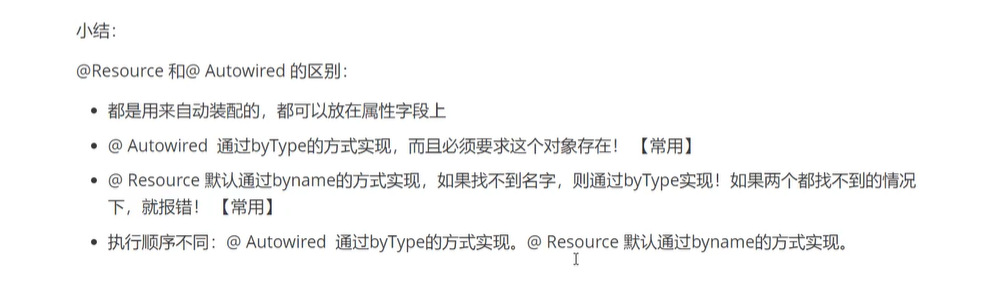
@Resource 和 @Autowired的区别:
注解说明
五、使用注解开发(anno) spring4之后,要使用注解开发,要导入aop的包
使用注释需要导入context约束,增加注解的支持
1 2 3 4 5 6 7 8 9 10 11 <?xml version="1.0" encoding="UTF-8"?> <beans xmlns ="http://www.springframework.org/schema/beans" xmlns:xsi ="http://www.w3.org/2001/XMLSchema-instance" xmlns:context ="http://www.springframework.org/schema/context" xsi:schemaLocation ="http://www.springframework.org/schema/beans http://www.springframework.org/schema/beans/spring-beans.xsd http://www.springframework.org/schema/context https://www.springframework.org/schema/context/spring-context.xsd" > <context:annotation-config /> </beans >
@Component :组件,放在类上,说明这个类被spring管理了即bean
1.bean 2.属性如何注入 1 2 3 4 5 6 7 8 9 10 11 12 @Component public class User public String name; @Value("姓名1") public void setName (String name) this .name = name; } }
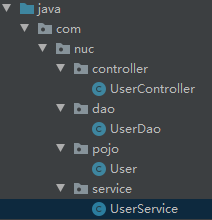
3.衍生的注解 @Compomemt有衍生注解,在web开发中会按照MVC三层架构分层
dao –@Repository
service –@Service
controller –@Controller
四个注解功能一样,都是代表将摸个类注册到spring中,装配bean
4.自动装配置
5.作用域 1 2 3 4 5 6 7 8 9 10 11 12 @Component @Scope("prototype") public class User public String name; @Value("姓名1") public void setName (String name) this .name = name; } }
6.小结 xml与注解:
xml万能,适合任何场景,维护简单
注解:不是自己类使用不了,维护相对复杂
最佳实践:
xml用来管理bean
注解只负责完成属性的注入
要想要注解生效,必须开启注解的支持
1 2 3 <context:component-scan base-package ="com.nuc" /> <context:annotation-config />
六、使用java的方式配置spring(appconfig) 不使用spring的xml配置,全交给java来做
JavaConfig是spring的一个子项目,在spring4之后称为了一个核心功能
实体类 1 2 3 4 5 6 7 8 9 10 11 12 13 14 15 16 17 18 19 20 21 @Component public class User private String name; public String getName () return name; } @Value("姓名1") public void setName (String name) this .name = name; } @Override public String toString () return "User{" + "name='" + name + '\'' + '}' ; } }
配置类 1 2 3 4 5 6 7 8 9 10 11 12 13 14 15 @Configuration @ComponentScan("com.nuc.pojo") @Import(NewConfig2.class) public class NewConfig @Bean public User getUser () return new User(); } }
测试类 1 2 3 4 5 6 7 8 9 10 public class MyTest public static void main (String[] args) ApplicationContext context = new AnnotationConfigApplicationContext(NewConfig.class); User getUser = (User) context.getBean("getUser" ); System.out.println(getUser.getName()); } }
纯java的配置方式 ,在spring boot中随处可见
七、代理模式 中介,这是spring aop的底层
分类:
1.静态代理 角色分析:
抽象角色:一般使用接口或抽象类来解决
真实角色:被代理的对象
代理角色:代理真实角色,一般会做一些附属操作
客户:访问代理对象的人
代码步骤
接口
1 2 3 4 public interface Rent public void rent () }
真实角色
1 2 3 4 5 6 public class Host implements Rent public void rent () System.out.println("房东出租房子" ); } }
代理角色
1 2 3 4 5 6 7 8 9 10 11 12 13 14 15 16 17 18 19 20 21 22 23 24 25 26 27 28 29 30 31 32 33 34 public class Proxy implements Rent private Host host; public Proxy () } public Proxy (Host host) this .host = host; } public void rent () host.rent(); seeHouse(); contract(); fare(); } public void seeHouse () System.out.println("中介带客户看房" ); } public void fare () System.out.println("中介收中介费" ); } public void contract () System.out.println("签租赁合同" ); } }
客户端访问代理角色
1 2 3 4 5 6 7 8 9 10 11 12 public class Client public static void main (String[] args) Host host = new Host(); Proxy proxy = new Proxy(host); proxy.rent(); } }
代理模式的优点:
可以使真实角色操作更加纯粹,不用关注一些公共的业务
公共的交给代理角色,实现了业务分工
公共业务发生拓展的时候,方便集中管理
缺点:
一个真实角色产生一个代理角色,代码量翻倍,开发效率降低
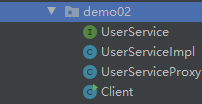
2.加深理解
代码
UserService
1 2 3 4 5 6 public interface UserService public void add () public void delete () public void update () public void query () }
UserServiceImpl
1 2 3 4 5 6 7 8 9 10 11 12 13 14 15 16 17 public class UserServiceImpl implements UserService public void add () System.out.println("增加了一个用户" ); } public void delete () System.out.println("删除了一个用户" ); } public void update () System.out.println("修改了一个用户" ); } public void query () System.out.println("查询了一个用户" ); } }
UserServiceProxy
1 2 3 4 5 6 7 8 9 10 11 12 13 14 15 16 17 18 19 20 21 22 23 24 25 26 27 28 29 30 31 32 33 public class UserServiceProxy implements UserService private UserServiceImpl userService; public void setUserService (UserServiceImpl userService) this .userService = userService; } public void add () log("add" ); userService.add(); } public void delete () log("delete" ); userService.add(); } public void update () log("update" ); userService.add(); } public void query () log("query" ); userService.add(); } public void log (String msg) System.out.println("使用了" +msg+"方法" ); } }
Client
1 2 3 4 5 6 7 8 9 10 public class Client public static void main (String[] args) UserServiceImpl userService = new UserServiceImpl(); UserServiceProxy proxy = new UserServiceProxy(); proxy.setUserService(userService); proxy.query(); } }
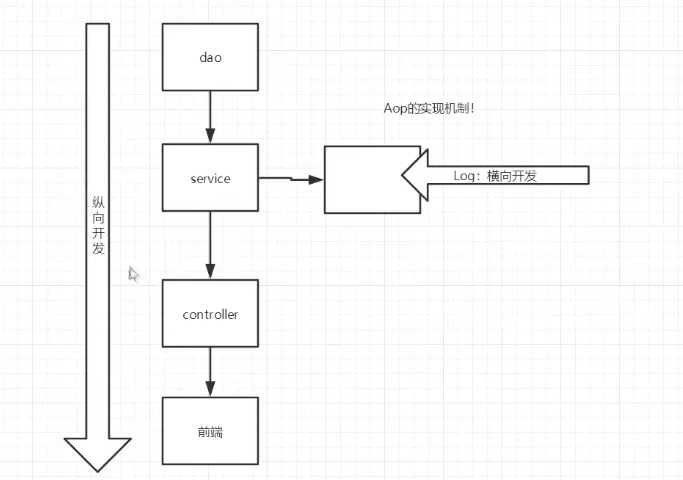
八、AOP 核心思想:
在不改变原来的代码的情况下,实现了对原有功能的增强
九、整合Mybatis 步骤 1.导入相关jar包
Junit
mybatis
mysql数据库
spring相关的
aop
mybatis-spring(new)
1 2 3 4 5 6 7 8 9 10 11 12 13 14 15 16 17 18 19 20 21 22 23 24 25 26 27 28 29 30 31 32 33 34 35 36 37 38 39 40 41 42 43 44 45 46 47 48 49 50 51 52 53 <dependencies > <dependency > <groupId > junit</groupId > <artifactId > junit</artifactId > <version > 4.13.2</version > <scope > test</scope > </dependency > <dependency > <groupId > mysql</groupId > <artifactId > mysql-connector-java</artifactId > <version > 5.1.49</version > </dependency > <dependency > <groupId > org.mybatis</groupId > <artifactId > mybatis</artifactId > <version > 3.5.7</version > </dependency > <dependency > <groupId > org.springframework</groupId > <artifactId > spring-webmvc</artifactId > <version > 5.3.10</version > </dependency > <dependency > <groupId > org.springframework</groupId > <artifactId > spring-jdbc</artifactId > <version > 5.2.18.RELEASE</version > </dependency > <dependency > <groupId > org.mybatis</groupId > <artifactId > mybatis-spring</artifactId > <version > 2.0.6</version > </dependency > <dependency > <groupId > org.aspectj</groupId > <artifactId > aspectjweaver</artifactId > <version > 1.9.7</version > <scope > runtime</scope > </dependency > <dependency > <groupId > org.mybatis</groupId > <artifactId > mybatis-spring</artifactId > <version > 2.0.6</version > </dependency > </dependencies >
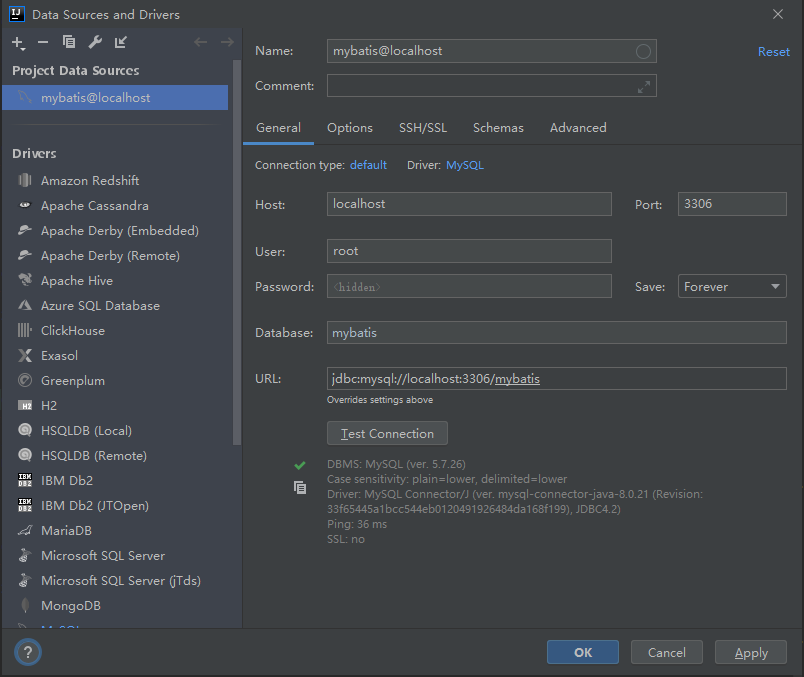
2.编写配置文件 3.测试 回忆mybatis 报错记录 idea连接的时候会报错
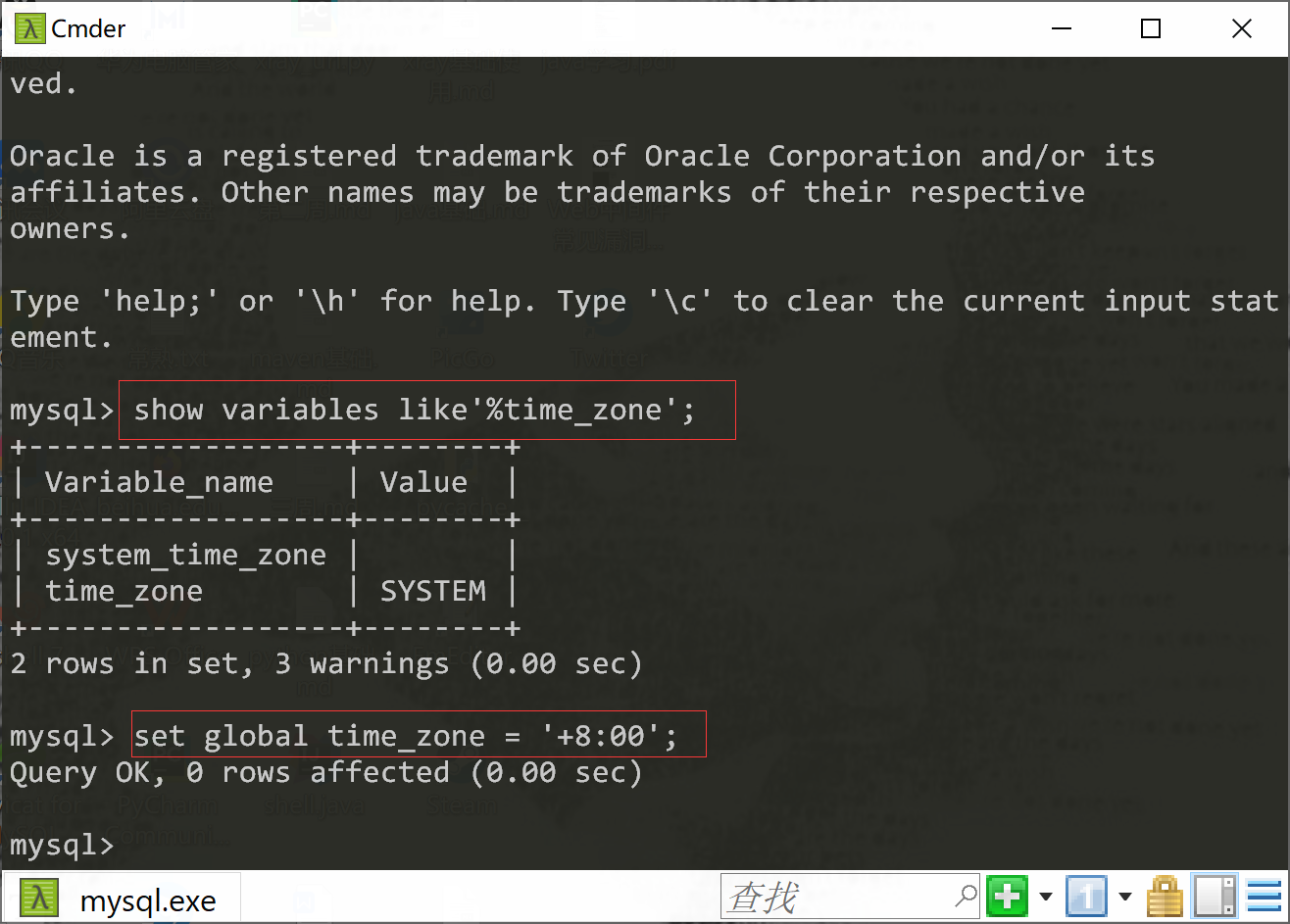
Server returns invalid timezone. Go to 'Advanced' tab and set 'serverTimezone' property manually.
需要在mysql中配置一下时区
连接成功
编写实体类
1 2 3 4 5 6 @Data public class User private int uid; private String uname; private String upassword; }
编写核心配置类
1 2 3 4 5 6 7 8 9 10 11 12 13 14 15 16 17 18 19 20 21 22 <configuration > <typeAliases > <package name ="com.nuc.pojo" /> </typeAliases > <environments default ="development" > <environment id ="development" > <transactionManager type ="JDBC" /> <dataSource type ="POOLED" > <property name ="driver" value ="com.mysql.jdbc.Driver" /> <property name ="url" value ="jdbc:mysql://localhost:3306/mybatis?useSSL=true& useUnicode=true& characterEncoding=UTF-8" /> <property name ="username" value ="root" /> <property name ="password" value ="root" /> </dataSource > </environment > </environments > <mappers > <mapper resource ="UserMapper.xml" /> </mappers > </configuration >
编写接口
1 2 3 4 public interface UserMapper public List<User> selectUser () }
编写Mapper.xml
1 2 3 4 5 6 7 8 9 10 11 <?xml version="1.0" encoding="UTF-8" ?> <!DOCTYPE mapper PUBLIC "-//mybatis.org//DTD Mapper 3.0//EN" "http://mybatis.org/dtd/mybatis-3-mapper.dtd" > <mapper namespace ="com.nuc.mapper.UserMapper" > <select id ="selectUser" resultType ="com.nuc.pojo.User" > select * from mybatis.user </select > </mapper >
测试
1 2 3 4 5 6 7 8 9 10 11 12 13 14 15 16 17 18 19 public class MyTest @Test public void test () throws IOException String resources = "mybatis-config.xml" ; InputStream in = Resources.getResourceAsStream(resources); SqlSessionFactory sessionFactory = new SqlSessionFactoryBuilder().build(in); SqlSession sqlSession = sessionFactory.openSession(true ); UserMapper mapper = sqlSession.getMapper(UserMapper.class); List<User> userList = mapper.selectUser(); for (User user : userList) { System.out.println(user); } } }